AI Chat Completions
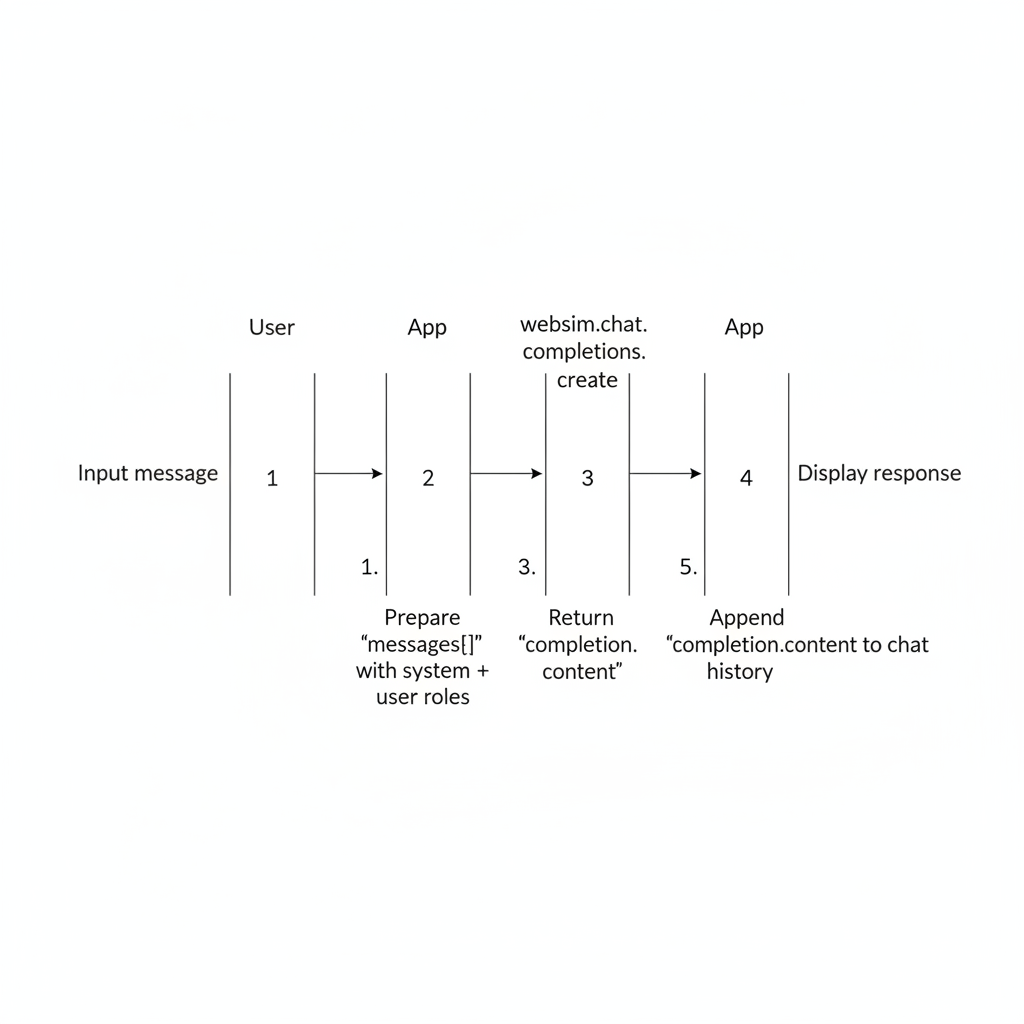
Engage with language models to generate text, answer questions, or perform various language-based tasks.
Basic AI Chat
To interact with the AI chat, you use the websim.chat.completions.create method. You need to provide a history of messages. The AI will respond based on this conversation history.
// Initialize or retrieve your conversation history
let conversationHistory = [];

async function sendMessageToAI(userMessageText) {
  const newMessage = {
    role: "user",
    content: userMessageText,
  };
  conversationHistory.push(newMessage);

  // Optional: Keep only the last 10 messages to manage context length
  conversationHistory = conversationHistory.slice(-10);

  try {
    const completion = await websim.chat.completions.create({
      messages: [
        {
          role: "system", // The system message is optional
          content: "You are a friendly assistant who speaks in rhyming verse.",
        },
        ...conversationHistory,
      ],
    });

    const aiResponse = completion.content;
    console.log("AI Response:", aiResponse);

    // Add AI's response to the history
    conversationHistory.push({ role: "assistant", content: aiResponse });

    return aiResponse;
  } catch (error) {
    console.error("Error communicating with AI:", error);
    // Handle error appropriately
    return "Sorry, I couldn't process that.";
  }
}

// Example usage:
// sendMessageToAI("What is two plus two?").then(response => {
//   // Update your UI with the response
// });
Key Points:
messagesarray:role: "system"(optional): Sets the behavior or persona of the AI.role: "user": Represents messages from the user.role: "assistant": Represents messages from the AI.
- Conversation History: Maintaining and sending the history is crucial for context-aware conversations.
- Error Handling: Always include error handling for API calls.
JSON Output Mode
You can instruct the AI to respond in a structured JSON format. This is useful for tasks where you need predictable, parsable output.
async function getStructuredDataFromAI(promptText) {
  try {
    const completion = await websim.chat.completions.create({
      messages: [
        {
          role: "system",
          content: `Combine the following concepts into a single, coherent idea.
Respond directly with JSON, following this JSON schema, and no other text.
{
  concept: string;
  emoji: string;
}`,
        },
        {
          role: "user",
          content: [
            { type: "text", text: promptText }, // e.g., "eggs + fire"
          ],
        },
      ],
      json: true,
    });

    const result = JSON.parse(completion.content);
    let concept = result.concept;
    let emoji = result.emoji;

    console.log("Concept:", concept, "Emoji:", emoji);
    return result;

  } catch (error) {
    console.error("Error getting structured data from AI:", error);
  }
}

// Example usage:
// getStructuredDataFromAI("ocean + stars").then(data => {
//   if (data) {
//     // Use data.concept and data.emoji
//   }
// });
Key Points:
json: true: Add this option to thecreatecall.- System Message Schema: Clearly define the expected JSON structure in your system prompt. The AI will adhere to this schema.
- Parsing: The
completion.contentwill be a JSON string, so you'll need to parse it usingJSON.parse().
Image Input with JSON Output
The AI can also process images and provide structured JSON output based on the image content.
async function analyzeImageWithAI(imageDataUrl) {
  try {
    const completion = await websim.chat.completions.create({
      messages: [
        {
          role: "user",
          content: [
            {
              type: "text",
              text: `Determine if the image is a natural photograph of an animal.
Respond directly with JSON, following this JSON schema, and no other text.
{
  isPhotograph: boolean;
  isAnimal: boolean;
  isInNature: boolean;
}`,
            },
            {
              type: "image_url",
              image_url: { url: imageDataUrl }, // e.g., from a file input or canvas
            },
          ],
        },
      ],
      json: true,
    });

    let result = JSON.parse(completion.content);
    let isPhotograph = result.isPhotograph;
    let isAnimal = result.isAnimal;
    let isInNature = result.isInNature;

    console.log("Image Analysis:", result);
    return result;

  } catch (error) {
    console.error("Error analyzing image with AI:", error);
  }
}
Key Points:
contentarray for user message:- One object with
type: "text"for your textual prompt and JSON schema definition. - One object with
type: "image_url"andimage_url: { url: imageDataUrl }for the image. The URL should be a data URL.
- One object with
json: true: Still required for structured JSON output.
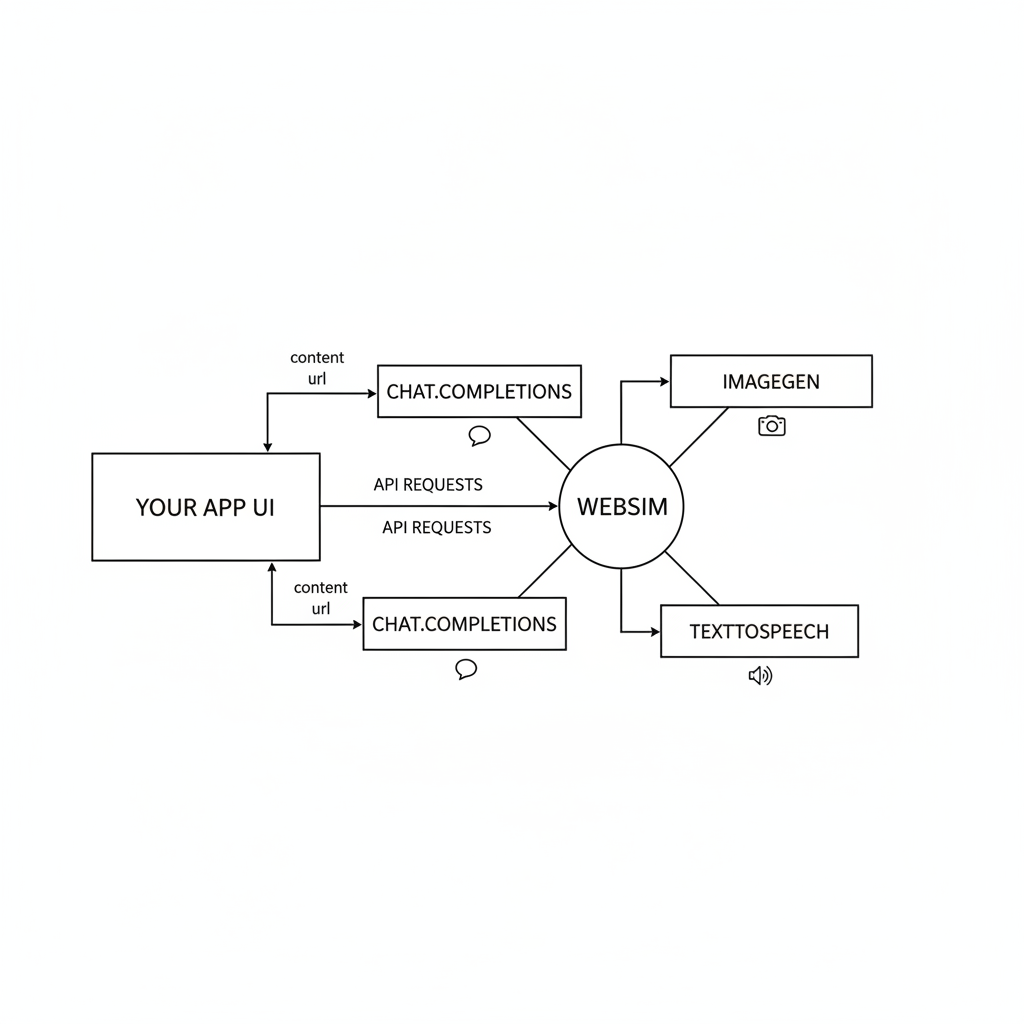
Visual Overview
AI Image Generation
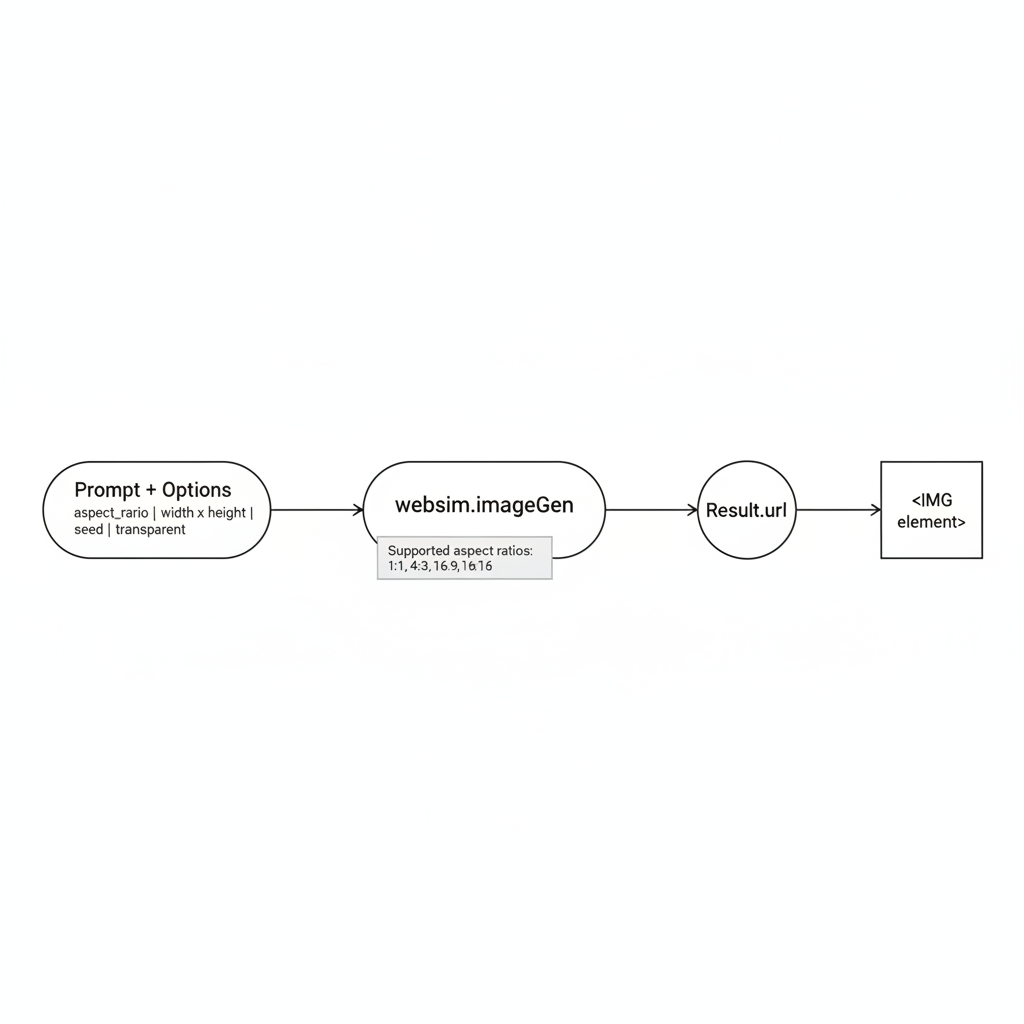
Generate images from textual descriptions or existing images using websim.imageGen.
websim.imageGen takes approximately 10 seconds. It is highly recommended to show a 10-second loading indicator to the user.
async function generateImageFromPrompt(promptText, aspectRatio = "1:1", seedValue, transparentBg = false) {
try {
const options = {
prompt: promptText,
aspect_ratio: aspectRatio, // "1:1", "16:9", "21:9", "3:2", "2:3", "4:5", "5:4", "3:4", "4:3", "9:16", "9:21"
transparent: transparentBg,
};
if (seedValue !== undefined) {
options.seed = seedValue; // Use a seed for reproducible variations
}
const result = await websim.imageGen(options);
console.log("Generated Image URL:", result.url);
// Use result.url to display the image, e.g.,  return result.url;
} catch (error) {
console.error("Error generating image:", error);
// Handle error
}
}
// Example usage:
// generateImageFromPrompt("A crayon child's drawing of a turtle", "16:9").then(url => {
// if (url) { /* display image */ }
// });
// generateImageFromPrompt("A photorealistic apple", "1:1", undefined, true).then(url => {
// if (url) { /* display image with transparent background */ }
// });
// You can also specify width and height directly (overrides aspect_ratio)
async function generateImageWithCustomDimensions(promptText, width, height) {
try {
const result = await websim.imageGen({
prompt: promptText,
width: width,
height: height,
});
console.log("Generated Image URL (custom dimensions):", result.url);
return result.url;
} catch (error) {
console.error("Error generating image with custom dimensions:", error);
}
}
// Example:
// generateImageWithCustomDimensions("A beautiful sunset over a calm ocean", 1024, 768);
return result.url;
} catch (error) {
console.error("Error generating image:", error);
// Handle error
}
}
// Example usage:
// generateImageFromPrompt("A crayon child's drawing of a turtle", "16:9").then(url => {
// if (url) { /* display image */ }
// });
// generateImageFromPrompt("A photorealistic apple", "1:1", undefined, true).then(url => {
// if (url) { /* display image with transparent background */ }
// });
// You can also specify width and height directly (overrides aspect_ratio)
async function generateImageWithCustomDimensions(promptText, width, height) {
try {
const result = await websim.imageGen({
prompt: promptText,
width: width,
height: height,
});
console.log("Generated Image URL (custom dimensions):", result.url);
return result.url;
} catch (error) {
console.error("Error generating image with custom dimensions:", error);
}
}
// Example:
// generateImageWithCustomDimensions("A beautiful sunset over a calm ocean", 1024, 768);
Image-to-Image Generation
You can use existing images as references for generation by passing an image_inputs array. You can provide 1-4 images as base64 data URLs.
// Utility to convert a URL to a Data URL
async function urlToDataUrl(url) {
  const response = await fetch(url);
  const blob = await response.blob();
  return new Promise((resolve, reject) => {
    const reader = new FileReader();
    reader.onloadend = () => resolve(reader.result);
    reader.onerror = reject;
    reader.readAsDataURL(blob);
  });
}

async function generateCartoonFromImage(sourceImageUrl, promptText = "Convert this image to a cartoon style") {
  try {
    const base64Image = await urlToDataUrl(sourceImageUrl);

    const result = await websim.imageGen({
      prompt: promptText,
      image_inputs: [
        { url: base64Image }
      ],
    });

    return result.url;
  } catch (error) {
    console.error("Image-to-image error:", error);
  }
}
Key Parameters for websim.imageGen:
prompt(string, required): The textual description of the image you want to generate.aspect_ratio(string, optional, default: "1:1"): Desired aspect ratio. Supported values: "1:1", "16:9", "21:9", "3:2", "2:3", "4:5", "5:4", "3:4", "4:3", "9:16", "9:21".width(number, optional): Desired width in pixels. If bothwidthandheightare provided, they overrideaspect_ratio.height(number, optional): Desired height in pixels. If bothwidthandheightare provided, they overrideaspect_ratio.transparent(boolean, optional, default: false): Set totrueto request an image with a transparent background (e.g., for PNGs).seed(number, optional): A seed value. Using the same seed with the same prompt will produce similar (but not always identical) images, allowing for controlled variations.image_inputs(array, optional): An array of 1-4 objects containingurl(base64 data URL) for image-to-image processing.
Result:
The method returns a promise that resolves to an object containing a url property. This URL points to the generated image.
Text to Speech (TTS)
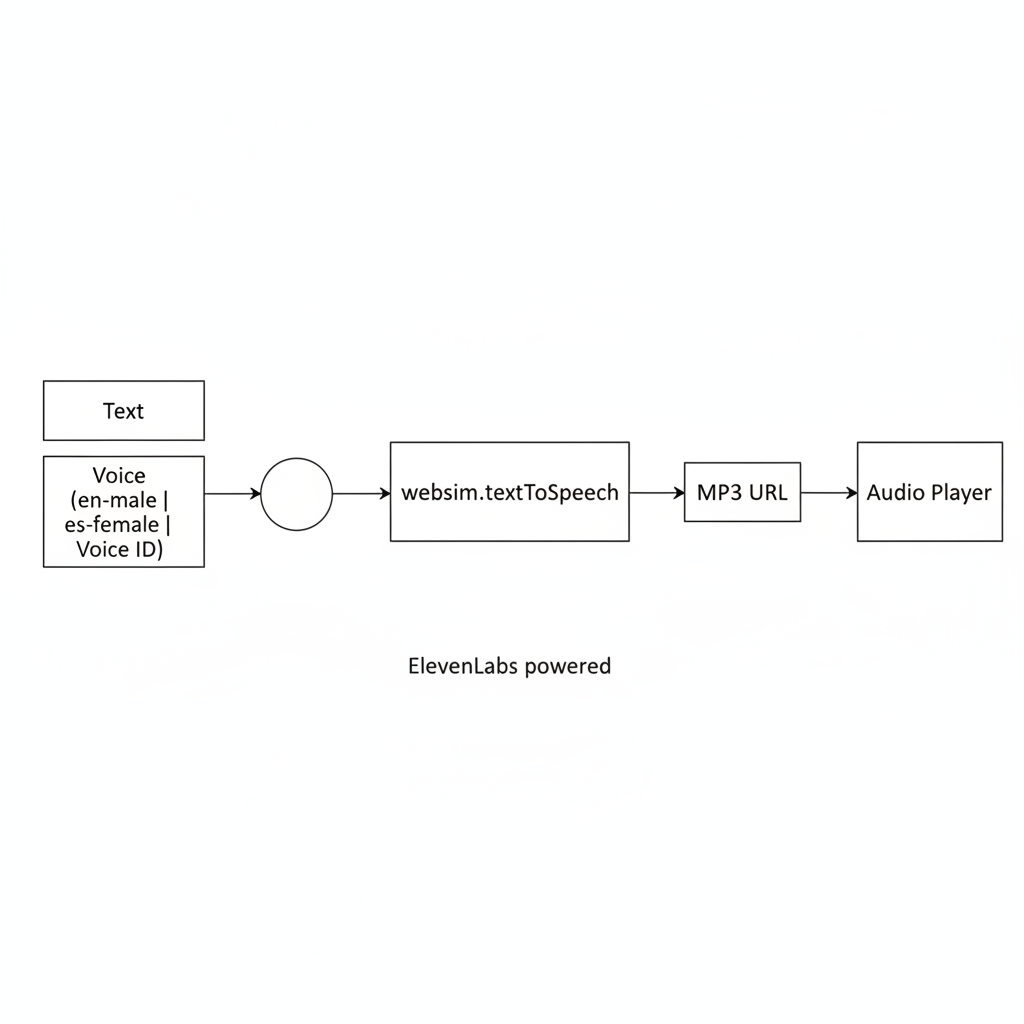
Convert text into spoken audio using websim.textToSpeech.
async function convertTextToSpeech(textToSpeak, voiceCode = "en-male") {
  try {
    const result = await websim.textToSpeech({
      text: textToSpeak,
      voice: voiceCode, // e.g., "en-male", "es-female"
    });

    console.log("Generated Speech Audio URL (MP3):", result.url);
    // Example:
    return result.url;

  } catch (error) {
    console.error("Error converting text to speech:", error);
  }
}

// ElevenLabs voice IDs are also supported:
async function convertTextToSpeechWithVoiceId(textToSpeak, elevenLabsVoiceId) {
  try {
    const result = await websim.textToSpeech({
      text: textToSpeak,
      voice: elevenLabsVoiceId, // e.g., "pNInz6obpgDQGcFmaJgB"
    });
    return result.url;
  } catch (error) {
    console.error("Error with TTS voice ID:", error);
  }
}
Key Parameters for websim.textToSpeech:
text(string, required): The text you want to convert to speech.voice(string, optional): Either a basic "$LANGUAGE-$GENDER" code or an ElevenLabs voice ID.- Supported language codes: "en", "es", "fr", "de", "it", "pt", "ru", "hi", "ja", "zh", "tl"
- Supported genders: "male", "female"
- Examples:
"en-male","es-female", or"pNInz6obpgDQGcFmaJgB"(ElevenLabs ID)
Result:
The method returns a promise that resolves to an object containing a url property to an .mp3 audio file.